
No Code Automation Tools: Indie-Built Picks for 2026
For a solo founder's project, start with a workflow automation tool such as Zapier, add a no-code database like Ragic or a Google Sheets backend, and bring in Xano when you need a real backend. Axiom.ai covers browser automation and Typeform handles data capture. Here is how the pieces fit, and how to pick.
No code automation tools connect apps and move data using visual triggers and actions instead of code. Typical jobs include syncing form responses to a database or sending an alert when a record changes. If you want to automate workflows without code, this is the category to start with.
I built the MyTools catalogue as a no-code directory myself, so I know how much repetitive work one person can drown in. This page sorts the catalogue's automation picks by the job they do. Let's break it down.
No Code Automation Tools and Databases for Solo Founders: What This Hub Covers
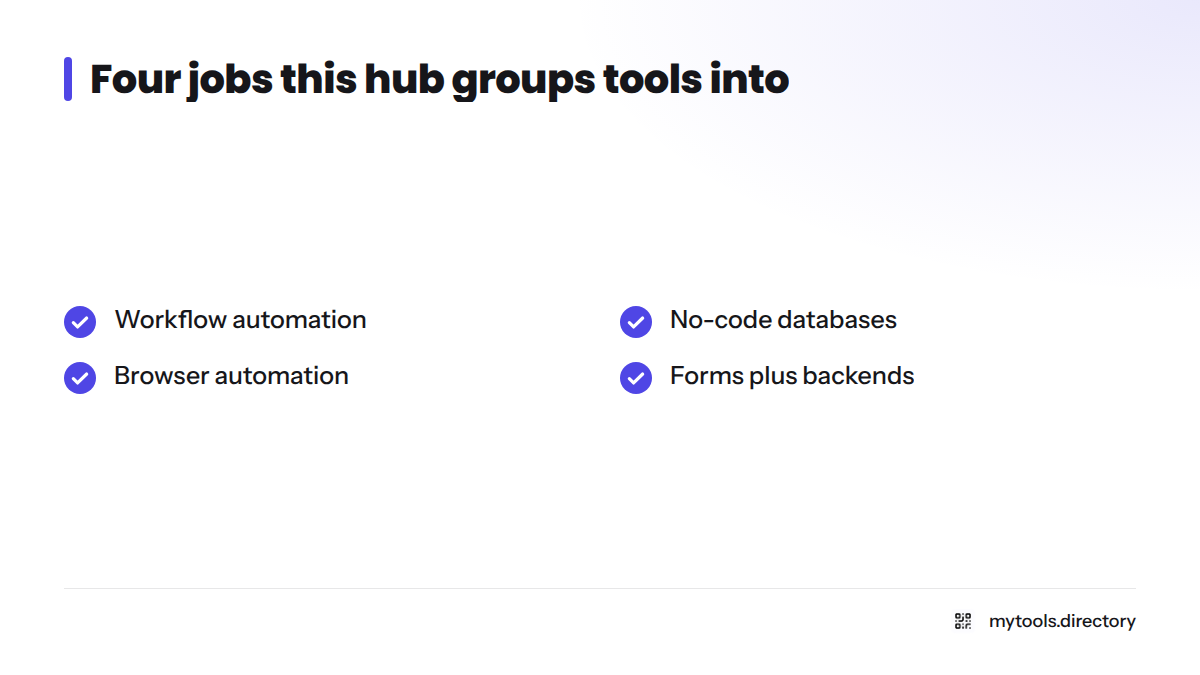
This page is a shortlist, not an encyclopedia. It groups automation tools for solo founders into four jobs: workflow automation, no-code databases, browser automation, and forms plus backends. Each group points you to the maker's own site.
Who this page is for
- Solo founders and indie hackers with repetitive work and no developer
- Small teams that want one person to own the automations
- Anyone comparing tools before opening a trial account
What is not covered here
Site and app builders live elsewhere. If that is your job, see the no-code app builders directory or the best no-code app builder picks for solo founders. Many internal tool builders sit in those lists too. For a broader ranked view, read the best no-code tools for indie hackers.
How I Vet and Tag Catalogue Tools (Free, Hot, New, Deal)
Makers submit every listing, and I review each one by hand before it goes live. I look for an indie maker or small team behind it, a working product, and a clear description of what it does. The vetting notes on each listing record what I saw, nothing more.
What each tag means
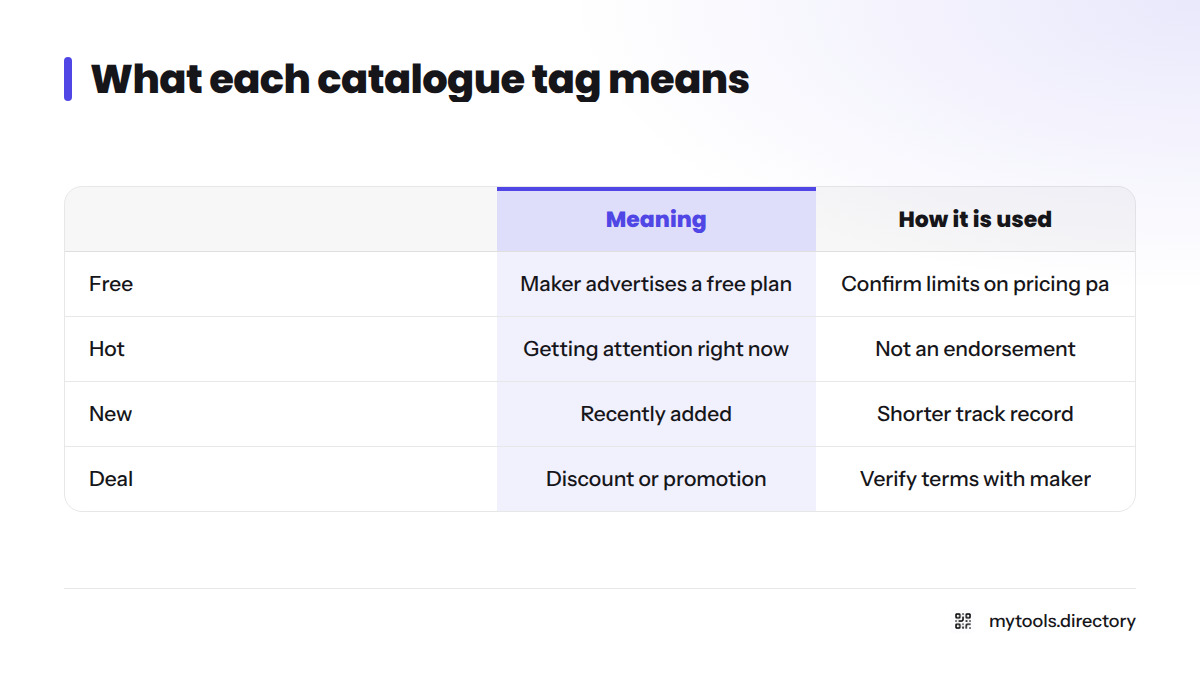
| Tag | Meaning | How it is used |
|---|---|---|
| Free | The maker advertises a free plan or free tier | A starting signal; confirm limits on the tool's own pricing page |
| Hot | Getting a lot of attention in the catalogue right now | Reflects catalogue activity, not an endorsement |
| New | Recently added to the catalogue | Newer tools have a shorter track record |
| Deal | The maker offers a discount or promotion | Verify terms with the maker before buying |
Popularity and top-rated sort signals
The popularity sort orders tools by how much attention they get inside the catalogue. The top-rated sort orders them by the ratings visitors leave there. Both are catalogue signals. Neither is a definitive ranking, and neither replaces your own trial.
Check before you commit: pricing and free-tier limits change often. Always confirm current numbers on each tool's own site.
Workflow Automation Tools Watch for a Trigger, Then Act
Workflow automation tools wait for a trigger, then run one or more actions in other apps. That covers most first-time automations.
Zapier and app-to-app automation
Zapier is the name most beginners meet first. You pick a trigger in one app, choose an action in another, and test the flow. It suits jobs like "new form response, then add a row, then send a message." Check Zapier's pricing page for current plan details, especially if you are hunting for free no code automation tools.
Other catalogue workflow tools
The catalogue also lists indie-built automation products. Two with their own pages are Veo Flow Automation and Grok Automation. Read each listing's tags and vetting notes before you try one.
No-Code Database Tools and Spreadsheet-Style Backends
Automations need somewhere to put data. A no-code database gives you records you can filter, link and update without writing queries.
Ragic and database-style tools
Ragic is a spreadsheet-style database builder. You design forms and sheets visually, and your automation tool writes to them. It fits inventory lists, client records and simple internal tools.
Google Sheets as a backend
A Google Sheets backend is the lowest-friction start. Most automation tools can add and update rows in a sheet, and you already know the interface. I often begin here. Move on when you need relationships between tables or heavier traffic.
Xano as a no-code backend
Xano is one of the no-code backend tools worth knowing. You build data tables and API endpoints visually, which helps when a front end or another service needs to call your data. Reach for it when a spreadsheet stops being enough.
Browser Automation Tools Handle Sites Without an API
Browser automation tools click, type and copy data in a web page for you.
Axiom.ai and browser automation without code
Axiom.ai lets you record steps in a browser and run them on a schedule. That suits repetitive copy-and-paste work and simple scraping.
When browser automation beats an API integration
Choose browser automation when the site has no integration or API you can use. Choose an app-to-app tool when an integration exists, because it is usually steadier than mimicking clicks.
Forms, Data Capture and Backend Tools
Typeform and form-to-database flows
Typeform collects answers through conversational forms. Pair it with an automation tool and each response can land as a row in your database.
Backend and API tools in the catalogue
For backend work, Xano (above) is the one I reach for first. Browse the no-code category and the developer tools page for indie-built options.
Finding the Most Popular and Top-Rated Automation Picks
Open the catalogue, filter to automation, and switch the sort between Popular and Top-rated. Treat what you see as a snapshot of catalogue signals, since it shifts as visitors rate and view tools. For a ranked view, use the best no-code tools list.
How to Choose Between These Tools for Your Project
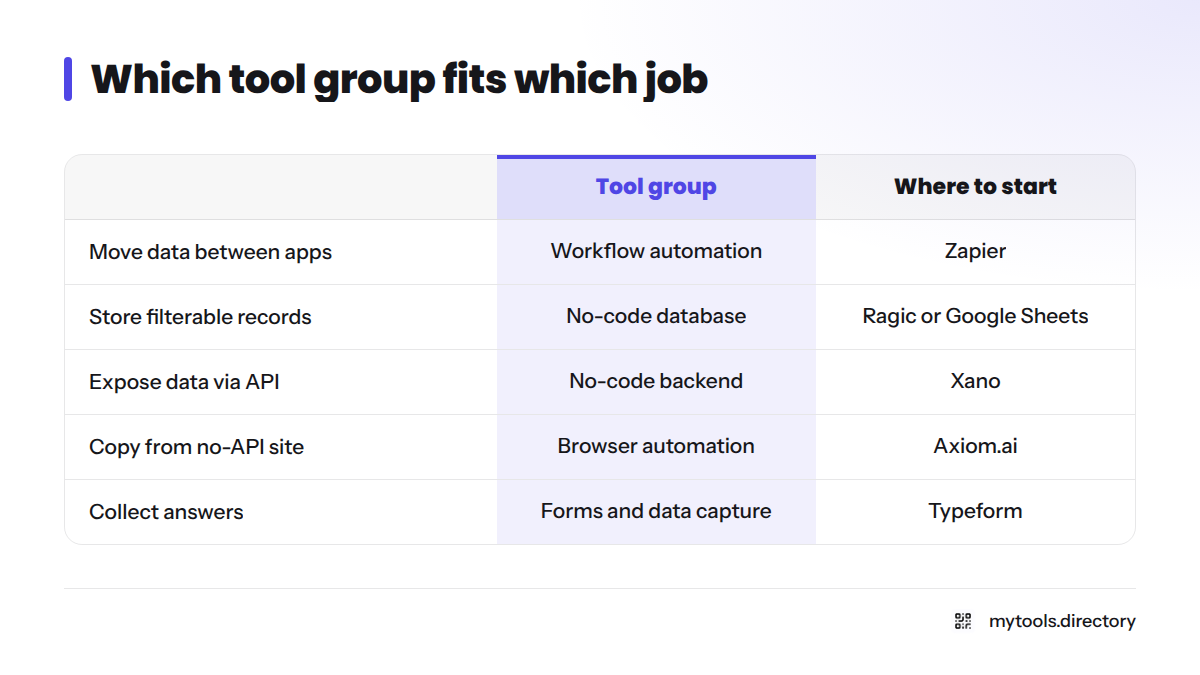
| Your job | Tool group | Where to start |
|---|---|---|
| Move data between apps | Workflow automation | Zapier |
| Store records you can filter | No-code database | Ragic or a Google Sheets backend |
| Expose data to an app via API | No-code backend | Xano |
| Copy data from a site with no API | Browser automation | Axiom.ai |
| Collect answers from people | Forms and data capture | Typeform |
Ask yourself five questions:
- What triggers the automation?
- Where does the data live?
- Do I need a backend, or will a sheet do?
- Is a free tier enough for now?
- Who maintains it when it breaks? (Usually you.)
Common starter combinations for a solo project
- Automation + database: Zapier writing rows into Ragic or a sheet
- Automation + form: Typeform responses triggering a Zapier workflow
- Automation + backend: Zapier or webhooks calling Xano endpoints
More hands-on resources sit in the solo founder hub.
Frequently Asked Questions
They connect apps and move data with visual triggers and actions instead of code. You describe what should happen, and the tool runs it.
Not always. If you only pass messages between apps, an automation tool is enough. Add a database or a Google Sheets backend when you need to keep and query records.
Many tools carry the Free tag in the catalogue. Limits differ and change, so check each maker's pricing page, such as Zapier's pricing, before you build on a free plan.
Makers submit their tools. I review each one by hand, record vetting notes, and apply the Free, Hot, New and Deal tags as described above.
Next Steps
Browse the filtered catalogue above, pick one job, and automate it this week. Have a product of your own? Submit your own tool to the catalogue.