daisyUI Review: Tailwind CSS Component Plugin

daisyUI is a free, open-source Tailwind CSS plugin that adds semantic component classes like btn and card, so you write less markup. It is pure CSS, so it works with any framework. Is it worth using? For fast builds, yes, as long as you accept the trade-offs below.
Here is the quick version of this daisyUI review. daisyUI trades a little control for a lot of speed. I like that trade on solo projects. Let's break it down so you can decide for yourself.
Verdict at a glance: Great for prototypes, MVPs, and indie builds. Skip it if you need a fully bespoke design system or ready-made JavaScript behavior. You can check the daisyUI listing on MyTools and reach the maker's site from there.
What daisyUI Is: The Short Answer
daisyUI is a component layer that sits on top of Tailwind CSS. Tailwind gives you low-level utility classes. The daisyUI Tailwind plugin bundles those utilities into named classes you can drop into plain HTML. You type btn btn-primary instead of a dozen utilities.
The project describes itself on its official site as a free and open source Tailwind CSS component library. Most developers describe it the same way: a practical companion for landing pages and app interfaces.
Is daisyUI Free? License and Cost
Yes. The project's GitHub repository publishes daisyUI under the MIT license, which permits commercial use. Check the LICENSE file in the repository before you ship. The project sets those terms, not this directory.
daisyUI at a Glance
| Detail | Summary |
|---|---|
| Type | Tailwind CSS plugin and component library |
| Cost | Free, open source (MIT, per the repository) |
| JavaScript required | No, components are pure CSS |
| Themes | Built-in themes plus custom theme support |
| Frameworks | Plain HTML, React, Vue, Svelte, Angular, Astro, Next.js |
| Install paths | npm or CDN, see the official docs |
daisyUI vs Tailwind: How They Work Together
The "daisyUI vs Tailwind" question is a bit misleading. daisyUI does not replace Tailwind. It needs Tailwind to run, and it adds a layer of components on top.
Semantic Component Classes on Top of Utilities
Tailwind is utility-first CSS. That keeps design flexible, but markup gets long. Here is a before and after for a simple button.
Plain Tailwind utilities:
<button class="inline-flex items-center justify-center rounded-lg bg-indigo-600 px-4 py-2 text-sm font-semibold text-white hover:bg-indigo-700 focus:outline-none focus:ring-2">
  Save
</button>
With daisyUI:
<button class="btn btn-primary">Save</button>
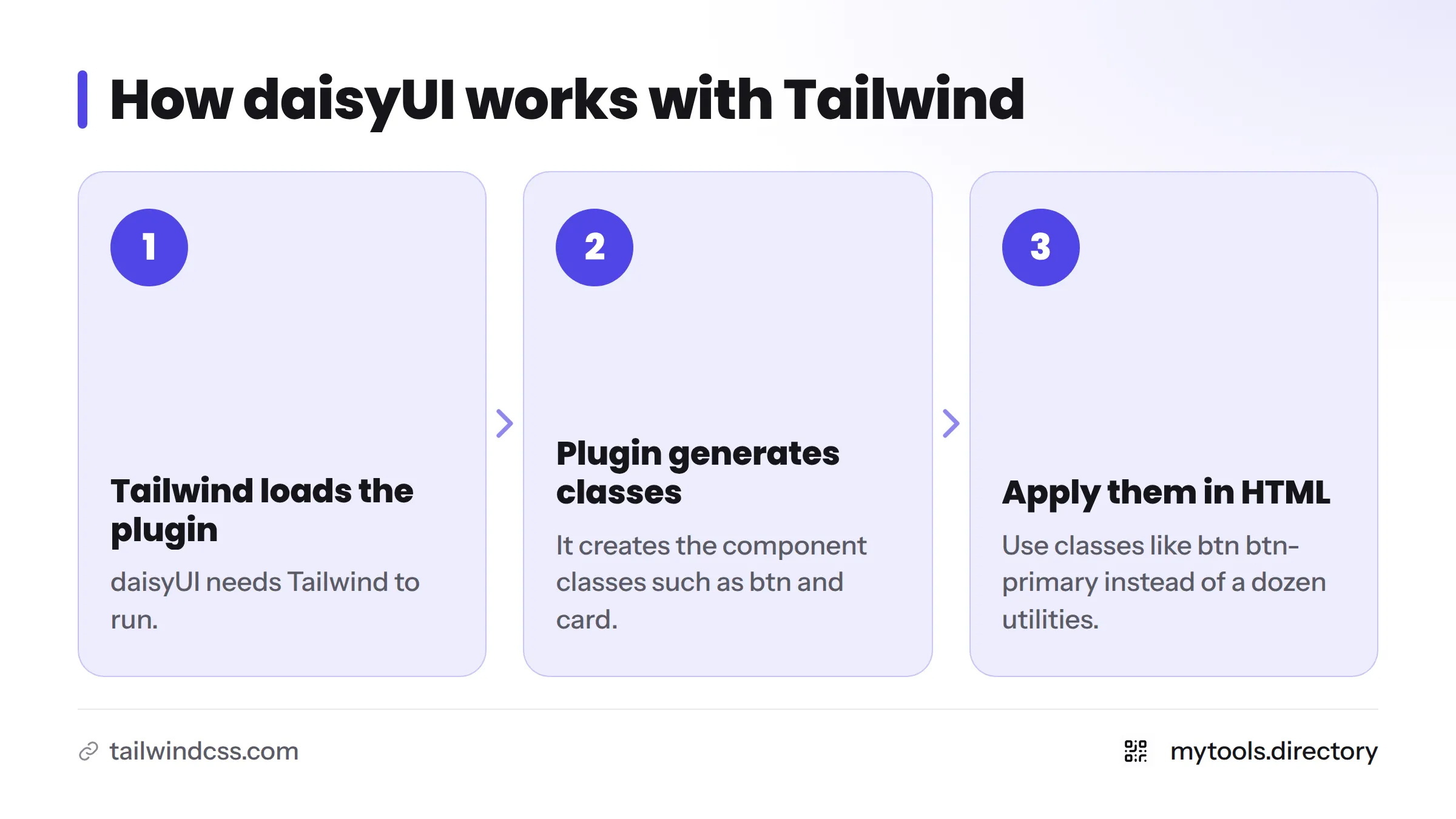
Two class names replace roughly a dozen utilities. daisyUI components such as cards, modals, dropdowns, and navbars follow the same pattern. The flow is simple: Tailwind loads the plugin, the plugin generates the component classes, and you apply them in your HTML.
daisyUI Themes and Design Tokens
daisyUI themes work through color roles such as primary, secondary, accent, and base. Each theme assigns values to those roles, and components read from them. Switch the theme and every component updates. You can also define your own theme, which maps your brand colors to design tokens without rewriting components.
If your designers work in Figma, the roles give you a shared vocabulary. I have not verified an official daisyUI Figma kit, so check the official site before you count on one.
Install daisyUI: npm, CDN, and Frameworks
Because it is only CSS, daisyUI has no framework lock-in. It works in daisyUI React and daisyUI Svelte projects, in Vue, Angular, and Astro templates, and in server-rendered stacks like Laravel or Rails.
For a daisyUI install, you have two routes: daisyUI npm, where you add the package to your Tailwind project, or the daisyUI CDN, which suits quick prototypes. The docs stay current with each release, so follow the official steps there rather than copying commands from me.
What the MyTools Listing Says About daisyUI
MyTools lists daisyUI under the title "Official daisyUI Store - Tailwind CSS Components (version 5 update is here)." The listing content comes from the maker's own site. Visit the daisyUI listing for the current category, tags, and any ratings shown there. I only report ratings that appear on the listing itself. MyTools may also earn from featured placements, so treat the listing as a starting point and verify details on the official site.
Strengths for Fast Indie Builds
My own rule: if a screen is not what makes my product special, I do not hand-style it. I reach for semantic classes and ship. That is where daisyUI earns its place.
- Less markup: one or two classes replace long utility strings.
- Readable HTML:
cardandbtnsay what an element is. - Quick prototyping: a usable interface in minutes.
- Built-in themes: dark mode and color variants without extra work.
- No JS bundle: components are CSS only.
- Partial adoption: use one or two components at a time, as community threads on r/tailwindcss often describe.
- Framework-agnostic: the same classes work everywhere.
Building a larger product? See more developer tools from indie makers and starter kits that use Tailwind.
Limits and Trade-Offs
Behavior Is Your Job
daisyUI styles components. It does not ship interactive logic. A modal needs your own open and close handling, or a small amount of framework code.
Class-Name Coupling and a New Vocabulary
You learn daisyUI's names and modifiers on top of Tailwind's, and your markup now depends on the plugin.
Look-Alike Risk and Customization Depth
Default themes are recognizable. Expect to customize colors, radius, and spacing so your site does not look like every other daisyUI site. Deep overrides are possible, but they cost time.
Not a Full Design System
You get styled components, not design governance rules.
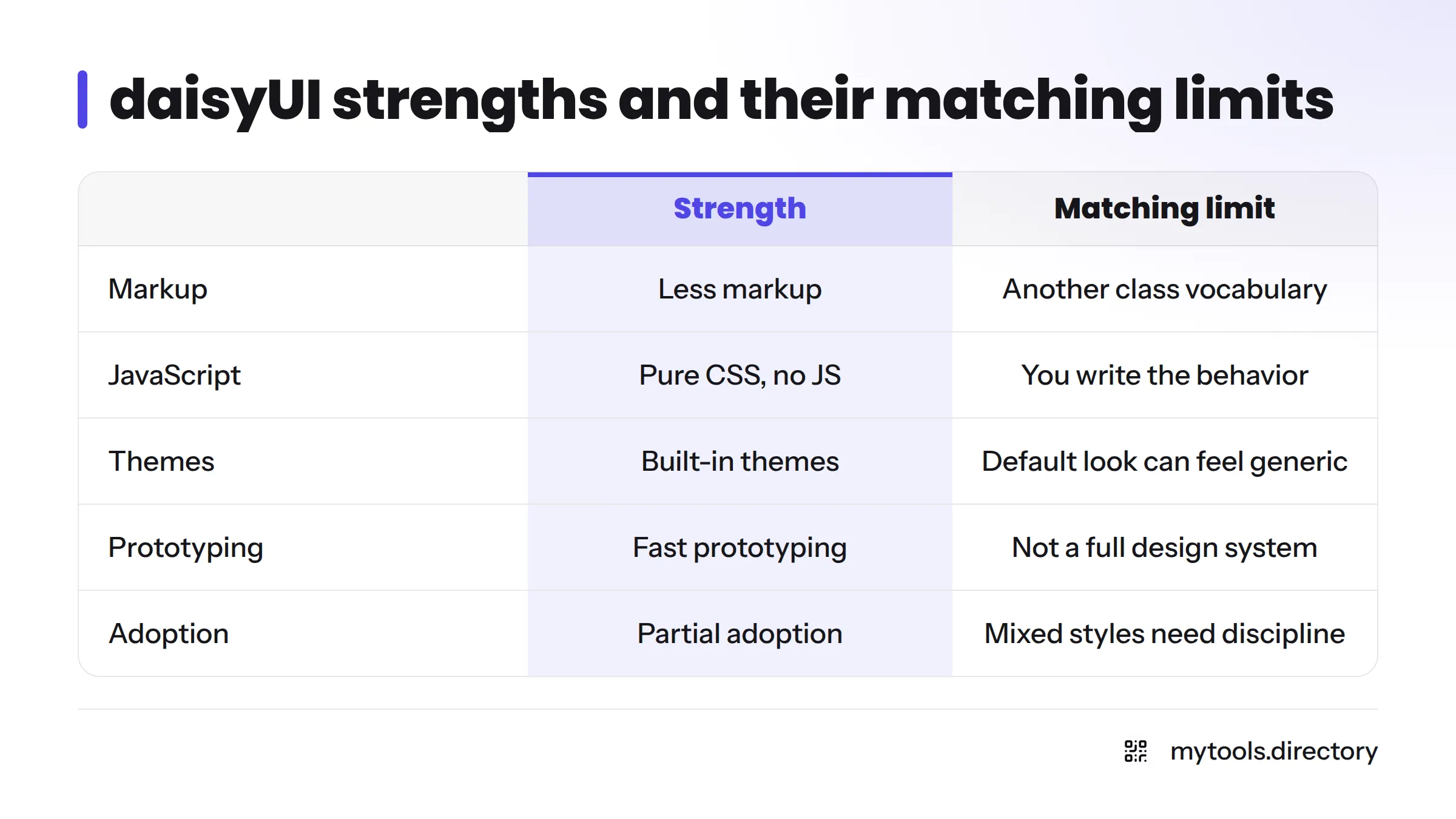
| Strength | Matching limit |
|---|---|
| Less markup | You learn another class vocabulary |
| Pure CSS, no JS | You write the interactive behavior |
| Built-in themes | Default look can feel generic |
| Fast prototyping | Not a full design system |
| Partial adoption | Mixed styles need discipline |
Who Should Use daisyUI and Who Should Skip It
Use it if:
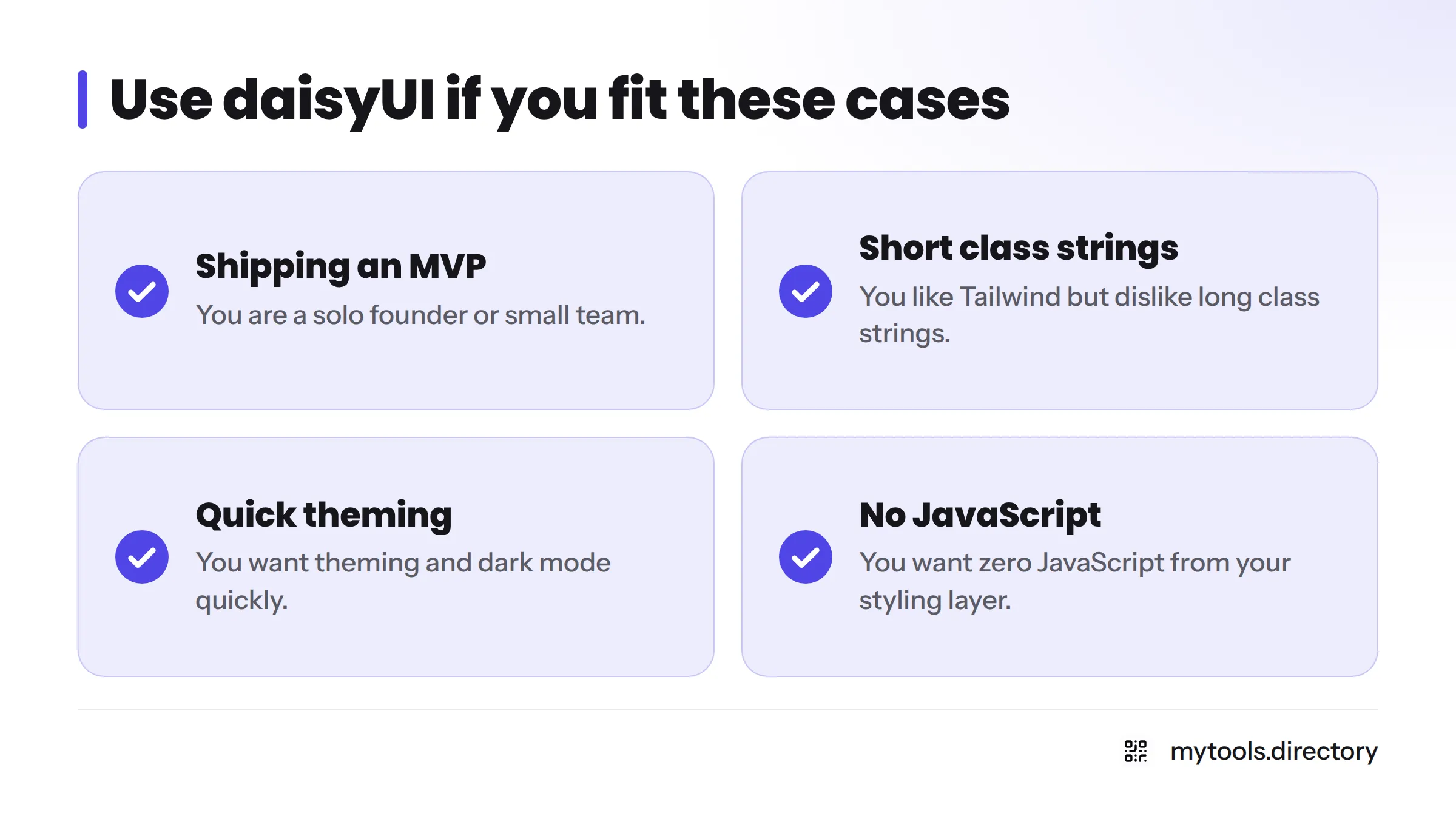
- You are a solo founder or small team shipping an MVP.
- You like Tailwind but dislike long class strings.
- You want theming and dark mode quickly.
- You want zero JavaScript from your styling layer.
Skip it if:
- You need a strictly bespoke brand system.
- You want prebuilt, accessible interactive behavior out of the box.
- Your team already has a shared design system.
Weighing alternatives such as Flowbite or shadcn/ui? A dedicated "Tailwind CSS component libraries compared" guide is the right place for a side-by-side. For wider context, read Best Developer Tools for Indie Hackers in 2026.
Verdict: Is daisyUI Worth Using With Tailwind CSS?
Yes, if you want speed, readable markup, and built-in themes on an indie build. No, if you need a custom design system or ready-made behavior. For most solo projects, I would start with daisyUI and override only what matters.
Next steps: open daisyUI through its MyTools listing, or browse the MyTools homepage for more tools.
FAQ
Yes. daisyUI is open source and published under the MIT license, per its GitHub repository.
No. Its components are pure CSS. Interactive behavior, such as opening a modal, is up to you.
Yes. It is a Tailwind plugin that generates CSS classes, so you apply them in React, Vue, Svelte, Angular, or plain HTML.
Tailwind provides utility classes. daisyUI adds semantic component classes like btn and card, plus themes, on top of Tailwind.